
Images, carousels of up to 10 and reels. First comment included.
Early access · Built, opening soon
Cadence
The social media scheduler your AI agent can use.
Plan the month and get every post approved. Cadence publishes each one on time. The extra: connect Claude Code, Codex or any MCP agent and it can schedule a whole week for you. Nothing goes out until a person approves it.
- Facebook Pages
- YouTube
Pricing is not final. Early access users hear first.
01The scheduler
A full social media scheduler first.
Before any agent touches it, Cadence does the everyday job of a scheduling app. Connect your accounts and plan the month. Once someone approves a post, it goes out at its time.
Facebook Pages
Text, photos and multi-photo posts to the Pages you manage. First comment included.
YouTube
Video uploads that go live at the time you set.
Text and image posts to your profile. First comment included. Company pages come later.
- Posting times per channelSet a weekly grid of times for each channel. Add to queue drops the post into the next free one.
- Or an exact timePick a date and time yourself when a post has to go out at 7:30 on Friday.
- CalendarWeek and month views of everything scheduled, waiting, posted or failed.
- Images and videoUpload photos, carousels and videos once. They stay locked, so the approved file is the one that posts.
- First commentPut the link or the hashtags in the first comment on Instagram, Facebook and LinkedIn.
- Live phone previewSee how the post looks on each platform while you type, before anyone approves it.
- ApprovalsEvery post waits for a yes from you, your client or your boss before it goes out.
- Team rolesInvite people by email as viewer, contributor, approver or admin, and limit them to certain channels.
- A workspace per clientEach brand gets its own channels, posting times and team. Switch between them from one login.
- Problems tabFailed posts and expired connections show up on the dashboard, with what to fix.
- Your timezoneTimes stay right in your timezone, including when the clocks change.
- Never twiceIf something crashes mid-post, Cadence checks with the platform before it retries.
Not in yet: analytics, a social inbox, caption writing and CSV import. X and Threads are planned.
02The extra: agents
Your agent does the scheduling.
Other tools let an agent post straight to your audience. In Cadence, an agent can only draft and schedule. A person releases it.
> schedule next week's 5 reels from ./inkwell-out reading channels and posting times uploading 5 videos cadence.create_posts (5) ✓ waiting for approval
Approvals
Monday reel: the cafe's new cold brew
Instagram · Mon 13:00
Drafted by agent · HoltSample view. One of five waiting.
- 1
Your agent drafts
It reads your channels and posting times, then drafts or schedules a post. Or it queues up to 50 in one go.
- 2
It lands in Approvals
Each post shows up tagged "Drafted by agent" with the name of the key that made it.
- 3
You approve on your phone
You see the post as it will appear, and approve or skip it.
- 4
Cadence publishes on time
The post goes out in its slot, and never twice.
Connect Claude Code
claude mcp add --transport http cadence https://api.productsdecoded.com/api/mcp --header "Authorization: Bearer <your key>"Codex and Cursor work the same way: add Cadence as an MCP server with the same key. You make the key in Settings, under Agents & API.
Keys are capped at drafting. They can't approve, publish or touch your settings. You can limit a key to specific channels, give it an expiry date, and revoke it instantly.
03Pairs with
Works well with Inkwell and Holt.

Inkwell
Give it a product URL and it reads the page imagery and brand colours, then renders ad videos for every aspect ratio. It makes the reels and ads your agent schedules.
See Inkwell →
Holt
The agent on your own machine. It remembers your brand voice and past posts, and it drives Cadence for you using Claude Code, Codex or Gemini as its brain.
See Holt →The pipeline: Inkwell makes the video, your agent writes the captions and schedules the week in Cadence, you approve on your phone, and Cadence publishes on time, never twice.
Holt is free and open source. Setting it up for you is a paid service on its own, and free when you buy Cadence. Inkwell is sold separately. Ask about the setup package.
04The problem
Posting is easy until you have to do it every day.
Posting times slip
When you juggle four apps and a reminder on your phone, the 6pm post tends to go out at 9pm, or not at all.
The wrong post goes out
Sooner or later an old caption ships with a new image, or a post meant for one page lands on three. Usually nobody notices until a customer does.
Approval lives in WhatsApp
You send a screenshot, the client replies "ok" two days later, and you are not sure which version they meant.
05How it works
From draft to published, with a person signing off in the middle.
- 1
Write it
Pick the channels and write the caption, with an image or video if the post needs one. A phone preview for each platform updates as you type.
- 2
Get it approved
Submit for approval. The approver sees the post exactly as it will appear and approves or skips it.
- 3
Add to queue
Cadence puts it in the next free posting time for that channel. Or pick an exact date and time yourself.
- 4
It publishes, once
The post goes out at its time. If something fails you see it on the dashboard, not three days later.
Each channel has its own weekly posting times. Add to queue fills the next free one, in your timezone, including when the clocks change.
06Approvals
The approver releases exactly what they saw.
Every post waits for approval before it goes out. If the caption, the media, the channels or the time change after the approver looked, the approval is refused and they look again.
Uploaded files are locked once they are uploaded, so the file that was approved is the file that posts. You can also require that a different person approves than the one who wrote it.
Your client or boss approves in Cadence, with the real preview in front of them. No screenshots, no "which version?".
07Teams and agencies
One account, a workspace for every client.
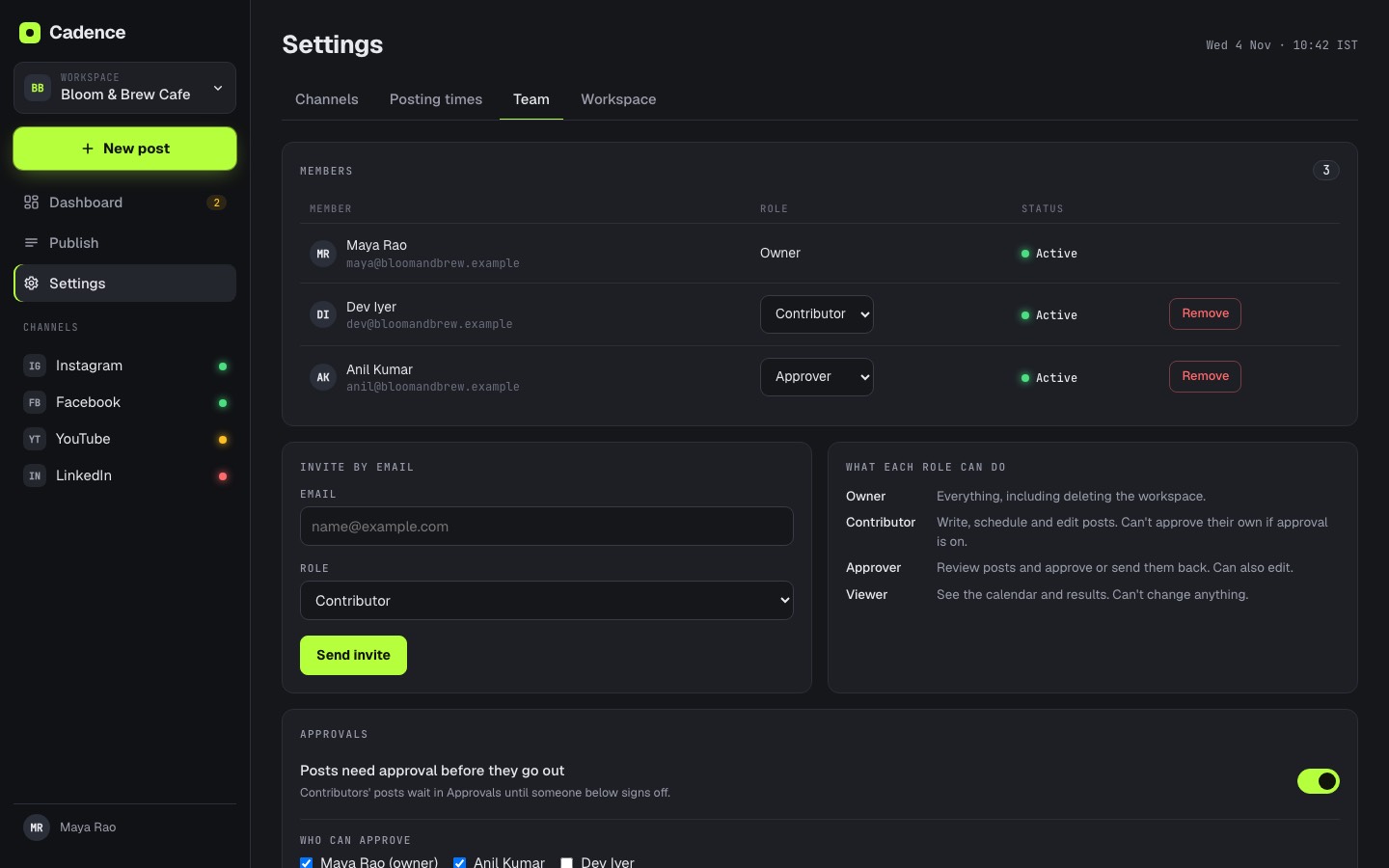
Give each brand or client their own workspace, with its own channels, posting times and team. Switch between them from one place. Invite people by email, give them a role, and limit them to the channels they should touch.
- ViewerSees the calendar and what is scheduled. Cannot change anything.
- ContributorWrites drafts and submits them for approval.
- ApproverApproves or skips posts that are waiting.
- AdminManages channels, posting times and the team.
- OwnerEverything an admin can do, for the whole account.
08Inside the app
What you will actually use every day.
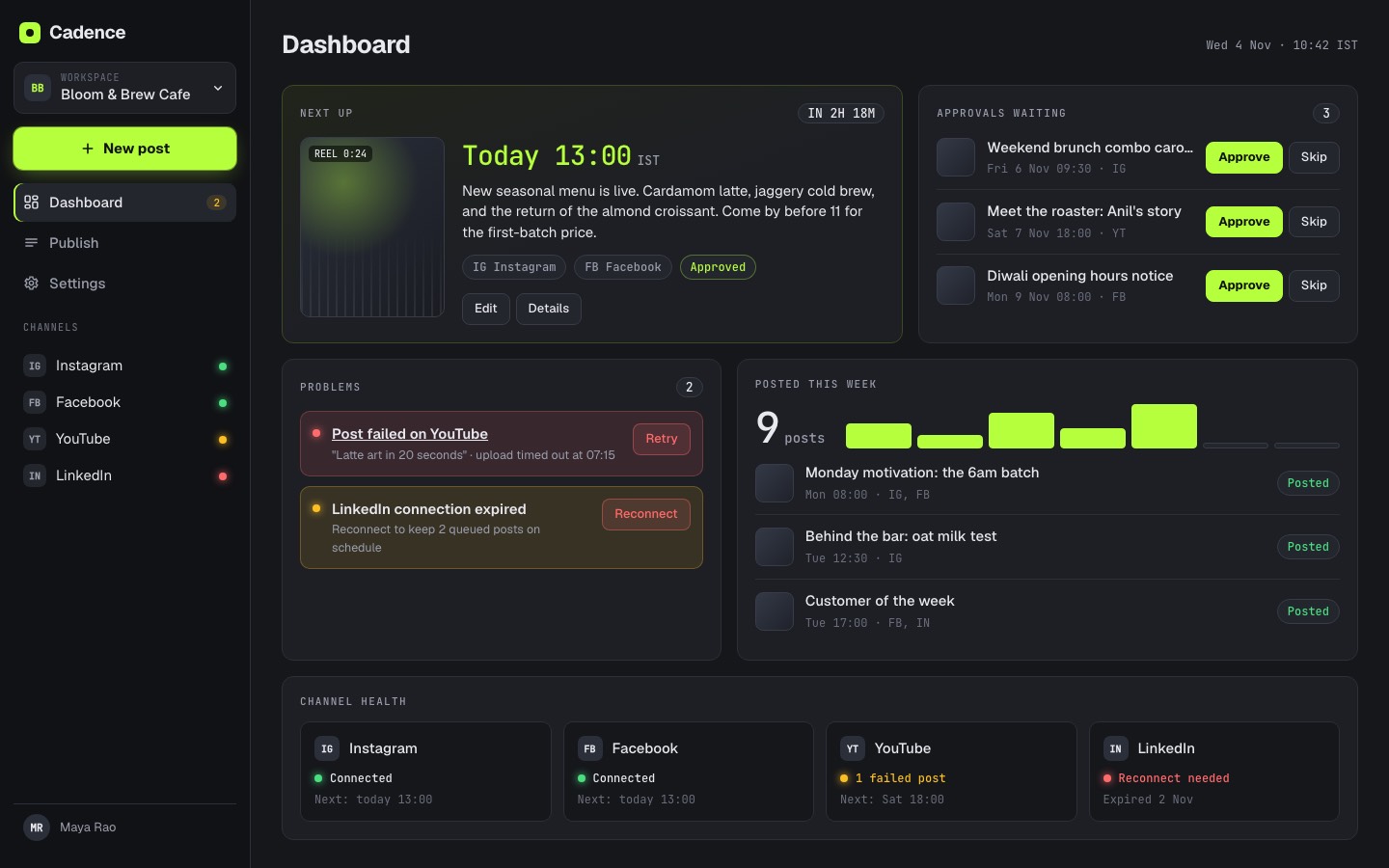
The dashboard shows the next post, approvals waiting, anything that failed, what posted this week and whether each channel is still connected.
-
Dashboard. What goes out next and what needs you.
-
Publish calendar. A week of posts, colour coded by status.
-
Composer. Live phone preview for each platform.
-
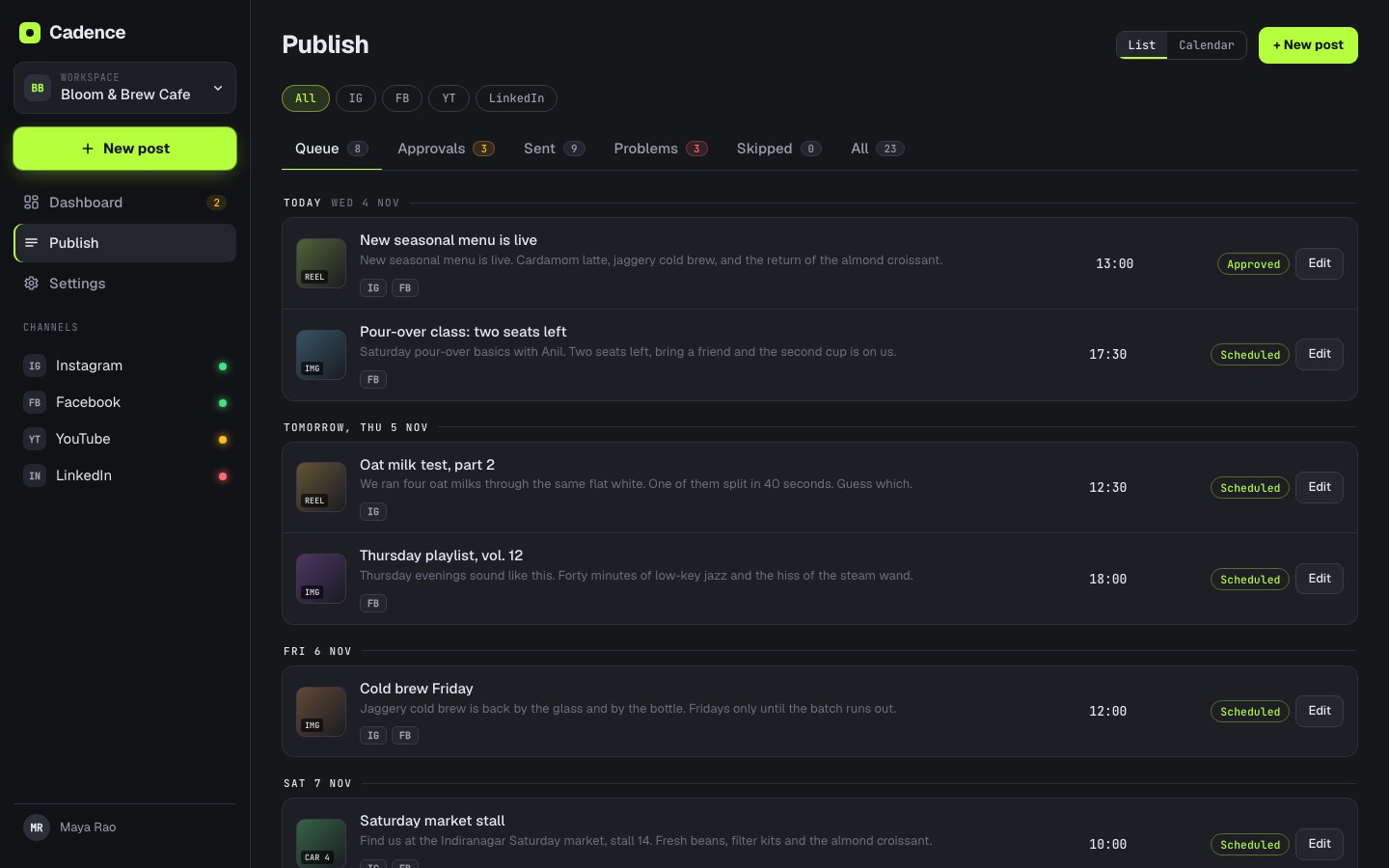
Publish list. Queue, approvals, sent and problems in tabs.
-
Posting times. A weekly grid for each channel.
-
Team. Roles, invites and who can approve.
-
On a phone. Approve from anywhere.
09Trust
Your accounts, handled carefully.
-
Disconnect and the tokens are gone.
Unplug a channel and Cadence deletes its access tokens for good. Reconnecting means logging in again.
-
We do not sell your data.
Not to advertisers, not to anyone. Your posts and your clients stay yours.
-
It is all written down.
A privacy policy, terms and a data deletion page, in plain English. Ask and we delete your data.
-
A real person runs it.
Operated by CoolHax Labs. Built and run by Debashis Nayak. About me.

10Questions
The things people ask first.
Which agents work with it?
Claude Code, Codex, Cursor and other agents that support MCP over HTTP. You connect them with one key from Settings. ChatGPT and claude.ai connectors may come later; they are not built yet.
Can an agent post without me?
No. An agent key can draft, edit and schedule posts, but it cannot approve or publish them, and it cannot change your settings. Every post an agent adds waits for a person in Approvals, tagged as drafted by an agent.
Do I need Holt or Inkwell?
No. Cadence works with any MCP agent on its own. Holt is free and open source, and if you buy Cadence we set Holt up for you at no charge. Inkwell is sold separately.
What will it cost?
Pricing is not final. We will announce it before launch, and early access users hear first.
Which platforms does it post to?
Instagram, Facebook Pages, YouTube and LinkedIn. You connect each one to a workspace and pick which channels a post goes to.
How many people can be on a team?
You can invite people by email and give each one a role: viewer, contributor, approver, admin or owner. You can also limit a person to specific channels.
Can I run several brands or clients?
Yes. Each brand or client gets its own workspace with its own channels, posting times and team, and you switch between them from one account.
Is my data safe?
Disconnect a channel and Cadence deletes its tokens. We do not sell your data. There are privacy policy, terms and data deletion pages, and you can ask us to delete your data.
Can I try it?
Cadence is built and in final checks, not launched yet. Join early access and we will email you when it opens.
Will it ever post the same thing twice?
It is built not to. If a post may have gone out when something crashed, Cadence asks the platform whether it did before it tries again.
Does it write captions or show analytics?
Not today. Cadence does scheduling, approvals and publishing, and tries to do those well.
11Early access
Be first in when Cadence opens.
Tell me a little about how you post today. I read every entry, and early access users hear about pricing and launch before anyone else.